Collaborate with Obsidian Bases
On this page
Keep your Base and the notes it uses in a Relay Shared Folder so your team can work with the same information. When someone changes a note’s properties, those changes sync to your collaborators and appear in their Base.
Starting with Relay 0.8.12, shared notes stay in sync even when they aren’t open. Keep Obsidian running with Relay enabled and connected, and a Base can show changes to notes you haven’t opened yourself.
Share a Base with your team
You’ll need a Shared Folder that your collaborators have added to their vaults, Relay 0.8.12 or later, and Obsidian’s Bases core plugin enabled.
The Shared Folder needs attachment storage to sync the .base file. The Markdown notes and their properties sync without that storage allowance.
- Put the
.basefile and the notes it uses inside the Shared Folder. - Check the Base’s filters include the shared notes you want everyone to see.
- Have your collaborator open the Base in their copy of the Shared Folder.
- Change a note property in the table and check that the new value appears in your collaborator’s table. The underlying note can stay closed.
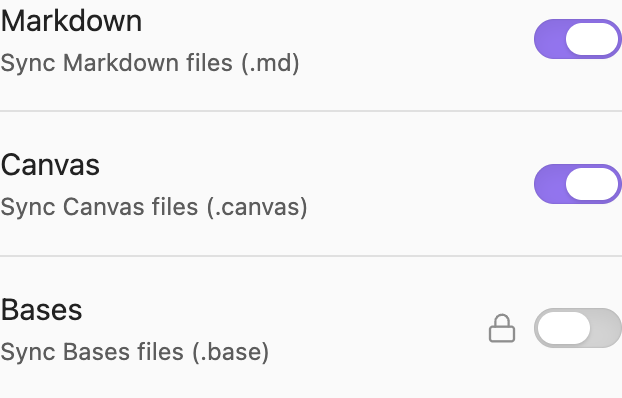
Relay enables Bases syncing by default in 0.8.12. To check the setting, open Relay settings, select the folder under My vault, and find Bases under Sync settings for this device. A lock beside Bases means the folder needs storage.
What gets shared
Share both the .base file and the notes it displays. The .base file defines the view: its filters, columns, sorting, and formulas. The notes contain the property values shown in the rows.
Changing a note property in a Base changes that note; changes to the note are reflected in the Base. Changing the view changes the .base file. Relay syncs the file you changed.
You can also keep your own Base outside the Shared Folder and use it to view shared notes. Everyone can arrange their own view of the same information. Only the notes need to sync in that case, so attachment storage isn’t required.
Why collaborators may see different rows
A Base shows the notes in your vault that match its filters. Sharing the .base file shares those filters. To share the matching notes, put them in the Shared Folder too.
Notes outside the Shared Folder may appear in your Base but be missing from your collaborator’s, because those notes haven’t been shared.
A Shared Folder can have a different local path in each collaborator’s vault. A filter that uses your vault’s folder path may show no rows in someone else’s copy.
Use a tag or note property to select the shared notes where possible. Check that the same filter selects the intended notes in both vaults; it can also match unshared local notes with the same tag or property.
Troubleshooting
| What you see | What to check |
|---|---|
| Notes arrive, but the Base is missing. | Check that the .base file is inside the Shared Folder, Bases syncing is enabled, and the folder has attachment storage. |
| The Base opens with missing rows. | Check that the corresponding notes are shared and match the filter in both vaults. A filter containing a vault-specific folder path can select different files. |
| The other table shows an old value. | Keep Obsidian running on both devices with Relay connected. Compare the property in the underlying note to distinguish a note-sync problem from a view-refresh problem. |
| An image is missing. | Share the image file too and check attachment storage. A link or a Base row does not transfer a file outside the Shared Folder. |
Related guides
- Share a folder
- Invite a collaborator
- Sync non-Markdown files
- Save attachments next to your notes
- Storage for shared files
- Obsidian Bases documentation for creating views, filters, and formulas.